


Introduction
Keeping an eye on multiple TYPO3 instances is hard work. Are all the core versions up to date? Do any extensions have security issues? Is the server configured correctly? T3 Monitoring by Georg Ringer answers all three from a single platform that watches every TYPO3 instance and alerts you the moment something is wrong.
The extension is aimed at agencies, hosting providers and IT departments that manage multiple TYPO3 installations and want to get ahead of security vulnerabilities and configuration problems rather than react to them.
T3 Monitoring pairs perfectly with the TYPO3 Updater: monitoring identifies outdated instances and the updater rolls out the updates automatically. Together they form a continuous DevOps pipeline for TYPO3.
Table of Contents
Use Cases
Agency, Hosting Provider, Enterprise
Conclusion
When it's worthwhile, Recommendation
Why T3 Monitoring?
Challenges in TYPO3 Management
For agencies with many TYPO3 projects:
- Checking 20+ instances by hand is slow and error-prone
- Security updates get overlooked or applied too late
- Server configuration issues go unnoticed
- No central view of where every project stands
For hosting providers:
- Client instances need proactive monitoring
- SLAs demand fast response times
- Documentation and reporting for compliance
- A solution that scales to hundreds of instances
For IT departments:
- Enterprise-grade monitoring and alerting
- Audit-proof documentation of security status
- Automated reports for management
- Less downtime through preventative maintenance
The Solution: T3 Monitoring
T3 Monitoring gives you a single monitoring instance that oversees all your TYPO3 installations:
Central Monitoring
A master installation monitors every client instance, with detailed lists, filters and search for a quick overview.
Automated Alerts
Email notifications for outdated cores, insecure extensions, server issues, or unreachable instances.
Comprehensive Reporting
Weekly reports, admin overviews, and client-specific notifications with all relevant details.
Features in Detail
Core Monitoring
T3 Monitoring continuously monitors the TYPO3 version of each client instance:
Feature Set:
- Version Tracking: Detection of outdated TYPO3 cores
- Security Alerts: Warnings for known security vulnerabilities
- LTS Status: Clear distinction between LTS and non-LTS versions
- Update Recommendations: Clear guidance on which updates to apply
Outdated TYPO3 cores are a serious security risk. T3 Monitoring automatically flags these instances and prioritises them in the reports.
Extension Security Monitoring
The extension checks all installed extensions against the TYPO3 Extension Repository (TER) security database:
Checked Criteria:
- Security advisories for installed extensions
- Outdated extension versions
- End-of-Life extensions
- Recommended updates
Limitation:
- Only extensions from the TER are monitored
- Extensions installed via Composer without TER registration are not checked
Extensions installed exclusively via Packagist/Composer, without a TYPO3 Extension Repository registration, cannot be checked for security issues automatically.
Server Configuration & Environment
T3 Monitoring checks various server and PHP configurations:
Monitored Parameters:
- PHP Version: Compatibility and support status
- SCRIPT_FILENAME: Detection of OPcache issues during deployments with symlinks
- Logging Configuration: Validation of
belogErrorReportingsettings - Email Configuration: SMTP reachability and functionality
- Database Status: Connection and performance
Uptime Monitoring
Basic availability checks for all registered clients:
How it works:
- Regular HTTP requests to client instances
- Timeout detection
- Status code validation
- DNS and SSL checks
Alert Configuration:
- Configurable error threshold (e.g. only after 3 failed attempts)
- Email notification for persistently unreachable instances
- All failed clients collected into a single report
Reporting & Notifications
Email Reports: Practical Examples
T3 Monitoring generates different report types for different audiences:
Client Report – Weekly Status
Each client instance can receive its own report by email:
Monitoring report of your clients
=================================


Server1
-------------------------------------------------
https://www.server1.at
Insecure core:
Insecure extensions:
Extra dangers:
- SCRIPT_FILENAME contains current: The server configuration is not correct. PHPOpcache is caching the symlink switch when deploying. Please check the nginx configuration!


Shopo1
-------------------------------------------------Failed Clients Report – Unreachable Instances
A separate report for unreachable clients:
Monitoring report of failed clients
===================================

The following clients could not be reached!

Server2: https://www.server2.at

Server3: https://www.server3.at
Configuration:
- Email recipients in Extension Configuration
- Error threshold configurable (e.g. only after 3 failed attempts)
- Frequency depending on the scheduler task
Admin Report – Global Overview
A summary report for administrators covering every problematic client:
Content:
- All instances with security issues
- Summary by criticality
- Statistics and trends
- Recommended actions
Frequency:
- Configurable via Scheduler
- Typically: daily or weekly
Installation & Setup
Architecture
T3 Monitoring consists of two components:
Master Installation (t3monitoring)
Central TYPO3 instance running the t3monitoring extension. Collects data from every client, displays dashboards and sends reports.
Client Installation (t3monitoring_client)
Installed on each TYPO3 instance you want to monitor. Exposes its data to the master installation via an API.
Step 1: Client Installation
On every TYPO3 instance you want to monitor:
# Via Composer
composer require georgringer/t3monitoring-client

# Activate extension
./vendor/bin/typo3 extension:activate t3monitoring_client
Configuration:
- Define a secret key (for API authentication)
- Enter it in the Extension Configuration
- Note down the access URL (e.g.
https://example.com/t3monitoring-api)
The client extension exposes an API endpoint that the master installation queries. Make sure this endpoint is reachable from outside.
Step 2: Master Installation
Set up the central monitoring instance:
# Via Composer
composer require georgringer/t3monitoring

# Activate extension
./vendor/bin/typo3 extension:activate t3monitoring
Configuration:
- Open the Extension Configuration
- Define the email recipients for reports
- Set the error threshold (e.g. 3 failed attempts)
Step 3: Register Clients
In the backend of the master installation:
- T3 Monitoring → Clients → New
- Enter client details:
- Name
- URL
- API Secret
- Email for client reports (optional)
- Save and run the first synchronisation
Step 4: Set up Scheduler Tasks
Three Symfony Console commands handle the automation:
| Command | Description | Recommended Frequency |
|---|---|---|
| monitoring:importClients | Updates data from all clients | Hourly |
| reporting:client | Sends client reports to configured email addresses | Weekly |
| reporting:admin | Sends admin report with an overview of all problematic clients | Daily/Weekly |
Scheduler Configuration:
# Import every 60 minutes
0 * * * * /path/to/typo3/console monitoring:importClients

# Client reports every Monday at 8:00
0 8 * * 1 /path/to/typo3/console reporting:client

# Admin report daily at 7:00
0 7 * * * /path/to/typo3/console reporting:admin --email=admin@example.com
Backend: Dashboard & Lists
Dashboard Overview
The T3 Monitoring backend offers several views:
Main functions:
- Client List: All registered instances with their status
- Filter: By TYPO3 version, security status or uptime
- Search: Quickly find a specific client
- Detail View: Full details for every instance
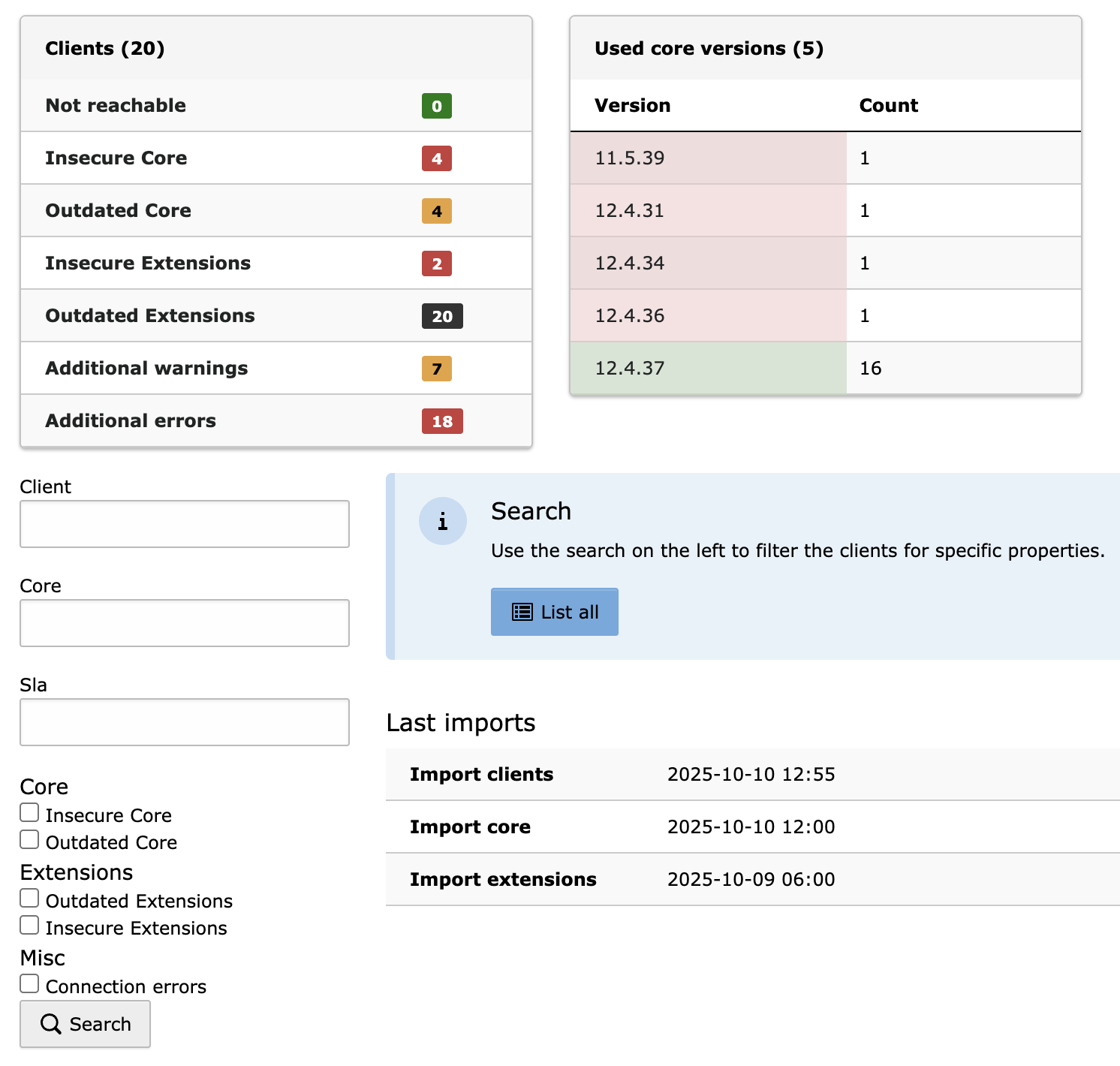
Dashboard overview of all TYPO3 instances: The central dashboard shows the status of every monitored site at a glance: unreachable instances, insecure core versions, outdated cores, insecure extensions, outdated extensions, and any additional warnings or errors. Colour-coded status indicators (green = OK, red = action required) make it easy to prioritise maintenance work.
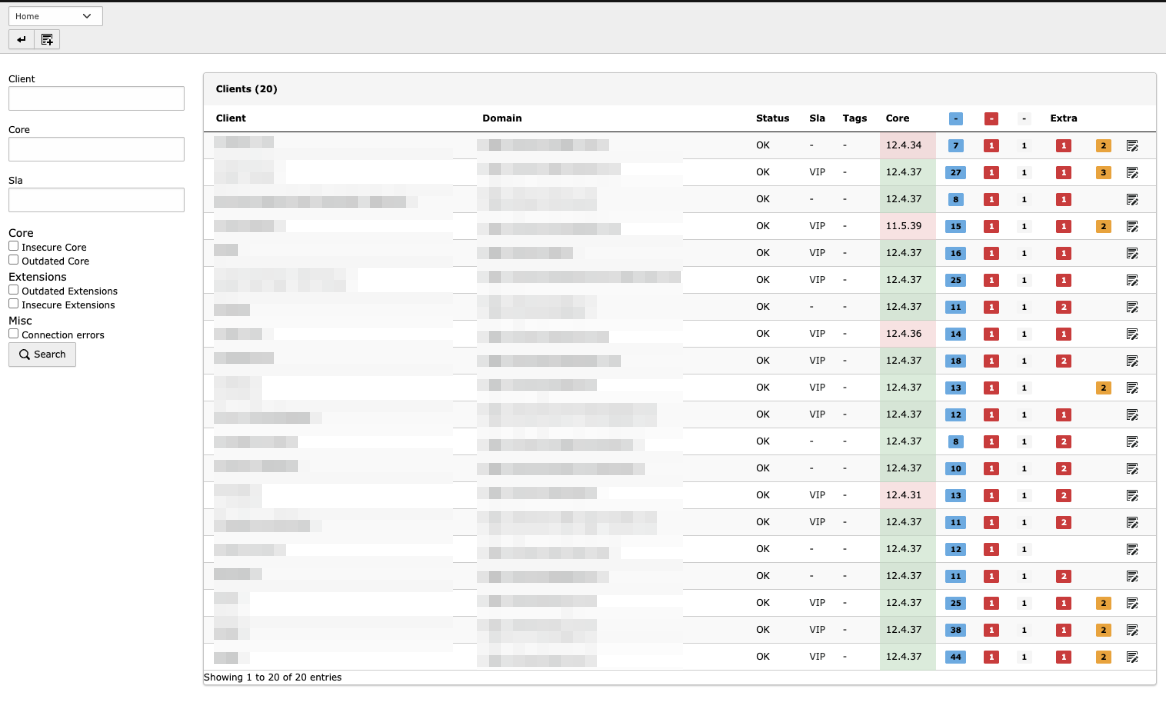
Client list with key details: The overview lists every registered TYPO3 instance alongside its most important data: name, URL, TYPO3 version, PHP version and current status. Filtering and sorting keep navigation quick, even with a large number of instances.
Detail View per Client
Available for each registered client:
Information:
- TYPO3 version and type (Classic/Composer)
- PHP version
- Installed extensions with versions
- Security status of each extension
- Server configuration
- Last synchronisation
- History
Actions:
- Refresh the data manually
- Edit the client
- Preview reports
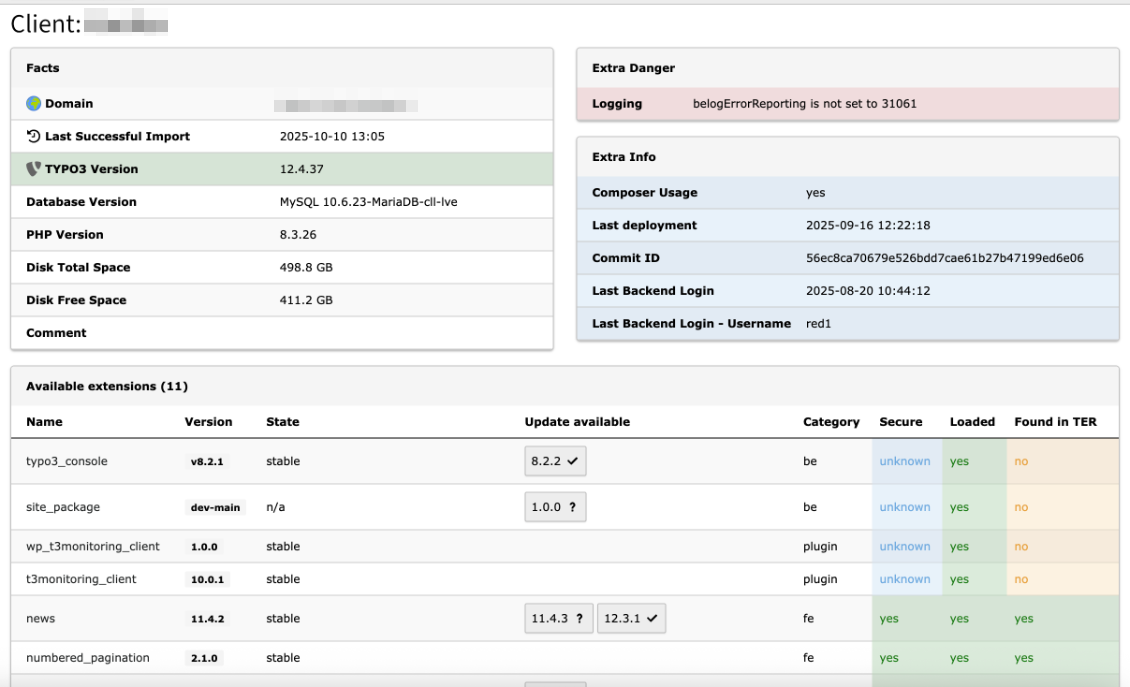
Instance detail view with complete information: The detail view of a single TYPO3 instance covers every relevant system parameter: the TYPO3 core version and installation type (Classic/Composer), PHP version and server configuration, all installed extensions with their version numbers, the security status of each extension, server warnings and errors, and the timestamp of the last synchronisation. It is the single source of truth for everything you need to maintain an instance.
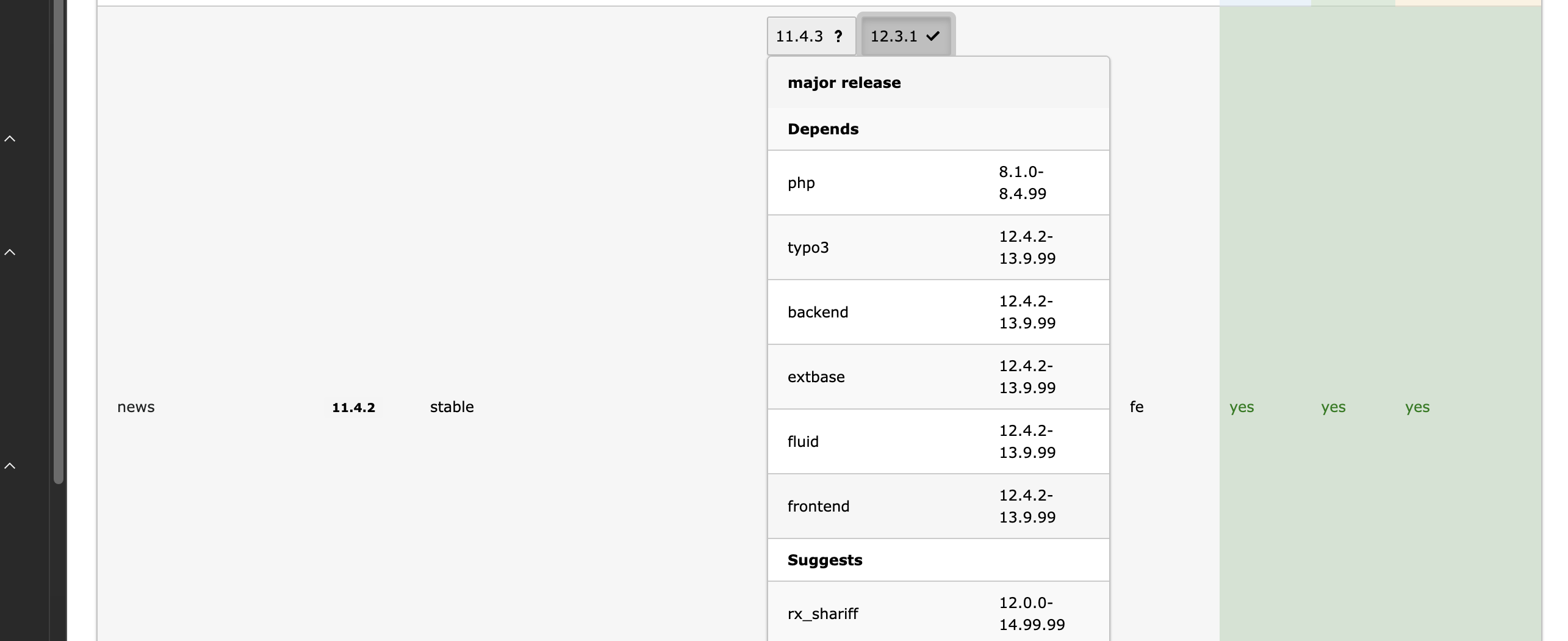
Extension detail view: This view lists every installed extension on a TYPO3 instance. For each one it shows the extension key, the currently installed version, any available updates, the security status (secure/insecure) and its dependencies. Extensions with known security vulnerabilities or pending security updates are highlighted, and the tabular layout gives you a quick read on what needs attention at the extension level.
Integration: T3 Monitoring + TYPO3 Updater
The combination of T3 Monitoring and TYPO3 Updater creates a continuous DevOps pipeline:
Workflow Integration
Monitoring identifies updates
Prioritisation by severity
TYPO3 Updater executes updates
Monitoring confirms success
Advantages of the Combination
Proactive Maintenance
Monitoring flags the need for action early, with minimal manual intervention required.
Quality Assurance
Monitoring checks the security status before and after updates. The Updater runs visual regression tests. Complete documentation.
Time & Cost Savings
Manual checking disappears, updates run semi-automatically and reports document every change.
Compliance & Audit
Seamless documentation of security status, an audit trail for update processes and SLA-compliant response times.
Pricing & Licensing
T3 Monitoring is an open-source extension by Georg Ringer with optional commercial support:
Licence & Usage
Open Source:
- GPL-2.0 licence
- Freely available via TYPO3 Extension Repository
- Source code on GitHub
- Community support via GitHub Issues
Commercial Support: Georg Ringer offers professional support and custom development:
- Setup Support: Installation and configuration of your monitoring instance
- Custom Features: Tailored to your specific requirements
- Priority Support: A direct line whenever issues arise
- SLA Contracts: Guaranteed response times for enterprise clients
For pricing and enquiries about commercial support, contact Georg Ringer directly via:
- GitHub: @georgringer
- TYPO3 Slack: Georg Ringer
- Sponsorship via GitHub Sponsors or Patreon
Donation Options
Support the development:
- GitHub Sponsors: github.com/sponsors/georgringer
- Patreon: patreon.com/georgringer
- PayPal: paypal.me/GeorgRinger
- Amazon Wishlist: Wishlist
Technical Requirements
System Requirements
| Feature | Master Installation | Client Installation |
|---|---|---|
| TYPO3 Version | 12 LTS | 12 LTS |
| PHP Version | 8.2 - 8.4 | 8.2 - 8.4 |
| Composer Mode | ✓ | ✓ |
| Database | MySQL/MariaDB/PostgreSQL | - |
| Scheduler/Cron | ✓ | ✕ |
| External Accessibility | ✕ | ✓ |
The client instances must be reachable from the master installation. Make sure firewalls and web servers are configured accordingly.
Supported TYPO3 Versions
The extension supports several TYPO3 versions:
Current Version (3.0.2):
- TYPO3 12 LTS (12.4.0 - 12.4.99)
Legacy Versions:
- Version 2.0.0: TYPO3 8 LTS
- Version 1.0.x: TYPO3 7-8 LTS
Use Cases & Best Practices
Agency with 20+ TYPO3 Projects
Starting Point:
- 25 TYPO3 instances across various hosting providers
- Manual checking takes 2-3 hours per week
- Security updates are occasionally overlooked
- No central documentation
Solution with T3 Monitoring:
- Time saved through automation: 85%
- Reduction in overlooked updates: 100%
- Improvement in security compliance: 95%
- Client satisfaction: 90%
Result:
- Weekly reports sent automatically by email
- Immediate alerts for critical security issues
- Compliance documentation generated automatically
- Combined with the TYPO3 Updater, updates are largely automated
Hosting Provider with 100+ Clients
Starting Point:
- A mix of TYPO3 versions in use
- SLA commitments to clients
- No proactive monitoring
- Reactive maintenance only once issues arise
Solution with T3 Monitoring:
- Central master installation
- All client instances registered as clients
- Automatic daily checks
- Clients receive weekly status reports
- Admin team receives a prioritisation list
Result:
- Proactive maintenance instead of reactive firefighting
- SLAs met, backed by automatic documentation
- Higher client satisfaction thanks to transparent reports
- A solution that scales with further growth
Enterprise IT Department
Starting Point:
- 5 TYPO3 instances (intranet, external websites)
- Compliance requirements (ISO, GDPR)
- Audit evidence required
- Internal SLAs for security updates
Solution with T3 Monitoring:
- Integrates with existing monitoring (e.g. Nagios/Zabbix via API)
- Automatic reports to the security team
- Audit trail from the change history
- Escalation process for critical issues
Result:
- Compliance evidence produced automatically
- Lower audit costs
- Faster response times for security issues
- Transparency for management
Limitations & Workarounds
Known Limitations
Extension Security only for TER extensions:
Extensions installed exclusively via Packagist, without a TYPO3 Extension Repository registration, cannot be checked for security issues automatically.
Workaround:
- Check important Packagist extensions manually via GitHub Security Advisories
- Add dependency-scanning tools such as Dependabot
- Build custom monitoring for critical extensions
Server configuration checks are limited:
- Not every server parameter is checked
- Complex setups (load balancers, CDNs) are only partially supported
Workaround:
- Supplement with dedicated server monitoring tools (Prometheus, Grafana)
- Add custom checks through extension development
Conclusion & Recommendation
T3 Monitoring is an indispensable extension for managing TYPO3 professionally:
When is T3 Monitoring worthwhile?
Clear recommendation for:
- Agencies with 5+ TYPO3 projects
- Hosting providers with TYPO3 clients
- IT departments with compliance requirements
- Anyone who takes security seriously
May be overkill for:
- A single TYPO3 instance without critical requirements
- Very small projects with no security risk
- Teams without DevOps processes
Why we recommend T3 Monitoring
Professional & Proven
Built by Georg Ringer, one of the most active TYPO3 core developers, and used in production by hundreds of agencies worldwide.
Open Source & Extensible
GPL licence, an active community and regular updates. Custom features can be built on top.
Time & Cost Savings
Automation pays for itself within a few weeks, and lower security risk reduces potential damage.
Perfect DevOps Integration
Combined with the TYPO3 Updater, it forms a continuous pipeline: monitoring → update → verification.
Next Steps
1. Try the extension:
- Set up the master installation
- Register 2-3 test clients
- Review the reports
2. Roll out to production:
- Add all your TYPO3 instances as clients
- Configure the scheduler tasks
- Set up email notifications
3. Optional: Integrate the TYPO3 Updater
- Monitoring identifies the updates
- The Updater applies them semi-automatically
- A complete DevOps pipeline
T3 Monitoring is a fantastic extension for managing TYPO3 professionally. Combined with the TYPO3 Updater, it gives you an outstanding infrastructure for multi-site environments.
Further Resources
Links & Documentation
Extension Repository:
Source Code:
Author & Support: