


MDX extends Markdown with React components, letting you drop interactive elements straight into static content. This pairs the simplicity of Markdown with the flexibility of a modern frontend framework.
Table of Contents
Part 1: Markdown Basics
Headings
Heading 1
Heading 2
Heading 3
Heading 4
Heading 5
Heading 6
Text Formatting
A paragraph with italic text, bold text and inline code.
This is a new paragraph with combined bold and italic text.
Abbreviations
Abbreviations with tooltip explanations for better accessibility.
The HTML specification is maintained by the W3C. Modern websites use CSS for styling and JS for interactivity.
For SEO, semantic HTML is important. The API communicates via REST or GraphQL.
<abbr title="Hypertext Markup Language">HTML</abbr>
<abbr title="World Wide Web Consortium">W3C</abbr>
<abbr title="Cascading Style Sheets">CSS</abbr>
<abbr title="Application Programming Interface">API</abbr>
Tip: Hovering over the abbreviations shows the full meaning.
Language Spans
Correctly marking up foreign language terms for screen readers and search engines.
The User Interface should offer a good User Experience. We follow the Don't Repeat Yourself principle (DRY).
The Pull Request was merged after the Code Review. Deployment runs through Continuous Integration.
The Café serves Cappuccino and Croissants.
<!-- English terms -->
User Experience
Pull Request
Code Review

<!-- Other languages -->
<span lang="fr">Café</span>
<span lang="it">Cappuccino</span>
<span lang="de">Gemütlichkeit</span>
Advantages: Screen readers can choose the correct pronunciation, and search engines understand the linguistic context.
Lists
Unordered List:
- First item
- Second item
- Nested item
- Another nested item
Ordered List:
- First step
- Second step
- Nested step
- Another nested step
Links and Images
A link to our website and a link with a title.
Blockquotes
Block quotes are ideal for citations, key statements, or highlighted information.
Example 1: Simple Quote
This is a block quote. It can be used for quotes, important notes, or highlighted statements.
Block quotes can contain multiple paragraphs.
Example 2: Expert Quote
"The best way to predict the future is to invent it."
— Alan Kay, Computer Scientist
Example 3: Important Note
Important: Server Components in Next.js 15 require a strict separation between server and client code. Ensure that no browser APIs are used in Server Components.
Code Blocks
Code blocks with syntax highlighting for various programming languages.
Inline Code: const x = 42 or npm install react
Example 1: TypeScript
Example 2: React Component (JSX)
Example 3: CSS Styling
Example 4: Shell Commands
Example 5: JSON Configuration
Markdown Syntax:
Part 2: Interactive UI Components
Tabs
Tabs structure related content and reduce initial page complexity.
<Tabs>
<Tab label="TypeScript">
```typescript
async function fetchData<T>(url: string): Promise<T> {
  const response = await fetch(url)
  if (!response.ok) throw new Error('Request failed')
  return response.json()
}
```
</Tab>
<Tab label="JavaScript">
```javascript
async function fetchData(url) {
const response = await fetch(url)
if (!response.ok) throw new Error('Request failed')Accordion
Accordion pattern for FAQ sections and structured information architecture.
Progress Bars
Show skill levels, progress through a process, or performance metrics at a glance.
Timeline
Lay out project milestones, release history, or development roadmaps in a clear sequence.
Next.js 15 Migration
Component Library Launch
MDX Integration
Card Grid
Cards for features, services, or structured information.
Performance
Server Components reduce JavaScript bundle size by up to 40%.
Type Safety
Full TypeScript integration with automatic type inference.
Developer Experience
Hot Module Replacement, ESLint, and Prettier support.
<CardGrid columns={3}>
<Card title="Performance" variant="elevated">
  Server Components reduzieren JavaScript-Bundle-Size um bis zu 40%.
</Card>
<Card title="Type Safety" variant="elevated">
  Vollständige TypeScript-Integration mit automatischer Type-Inference.
</Card>
<Card title="Developer Experience" variant="elevated">
  Hot Module Replacement, ESLint und Prettier-Support.
</Card>
</CardGrid>
Tooltip
Tooltips provide contextual information without interrupting the flow of reading.
Tooltips are particularly useful for technical abbreviations or technical terms.
{/* Inline Tooltip */}
<Tooltip content="TYPO3 is an enterprise content management system" side="bottom">
technical abbreviations
</Tooltip>

{/* Button Tooltips */}
<div className="flex flex-wrap gap-4 my-8">
<Tooltip content="Tooltip top" side="top">
  <button className="px-4 py-2 bg-neutral-100 rounded hover:bg-neutral-200">Top</button>
</Tooltip>
<Tooltip content="Tooltip bottom" side="bottom">
  <button className="px-4 py-2 bg-neutral-100 rounded hover:bg-neutral-200">Bottom</button>
</Tooltip>
<Tooltip content="Tooltip left" side="left">
<button className="px-4 py-2 bg-neutral-100 rounded hover:bg-neutral-200">Left</button>Features: WCAG 2.1 AA compliant, keyboard navigation, touch support for mobile, smart positioning
Part 3: Data Visualisation
Charts
Interactive charts based on the Recharts library.
Line Chart
| month | revenue | profit |
|---|---|---|
| Jan | 45000 | 12000 |
| Feb | 52000 | 15800 |
| Mar | 48000 | 14200 |
| Apr | 61000 | 19500 |
| May | 58000 | 17800 |
| Jun | 69000 | 22100 |
// Data
const salesData = [
{ month: 'Jan', revenue: 45000, profit: 12000 },
{ month: 'Feb', revenue: 52000, profit: 15800 },
{ month: 'Mar', revenue: 48000, profit: 14200 },
{ month: 'Apr', revenue: 61000, profit: 19500 },
{ month: 'Mai', revenue: 58000, profit: 17800 },
{ month: 'Jun', revenue: 69000, profit: 22100 },
]

// Component
<Chart
data={salesData}
type="line"
xAxisKey="month" Bar Chart
| week | lcp | fcp | tti |
|---|---|---|---|
| W1 | 2.4 | 1.8 | 3.2 |
| W2 | 2.1 | 1.5 | 2.8 |
| W3 | 1.8 | 1.2 | 2.4 |
| W4 | 1.5 | 0.9 | 2 |
// Data
const performanceData = [
{ week: 'W1', lcp: 2.4, fcp: 1.8, tti: 3.2 },
{ week: 'W2', lcp: 2.1, fcp: 1.5, tti: 2.8 },
{ week: 'W3', lcp: 1.8, fcp: 1.2, tti: 2.4 },
{ week: 'W4', lcp: 1.5, fcp: 0.9, tti: 2.0 },
]

// Component
<Chart
data={performanceData}
type="bar"
xAxisKey="week"
bars={['lcp', 'fcp', 'tti']}
height={300}Area Chart
| day | visitors | pageviews | conversions |
|---|---|---|---|
| Mon | 3200 | 8500 | 145 |
| Tue | 4100 | 10200 | 189 |
| Wed | 3800 | 9400 | 165 |
| Thu | 4500 | 11800 | 210 |
| Fri | 5200 | 14200 | 245 |
// Data
const trafficData = [
{ day: 'Mo', visitors: 3200, pageviews: 8500, conversions: 145 },
{ day: 'Di', visitors: 4100, pageviews: 10200, conversions: 189 },
{ day: 'Mi', visitors: 3800, pageviews: 9400, conversions: 165 },
{ day: 'Do', visitors: 4500, pageviews: 11800, conversions: 210 },
{ day: 'Fr', visitors: 5200, pageviews: 14200, conversions: 245 },
]

// Component
<Chart
data={trafficData}
type="area"
xAxisKey="day"
areas={['visitors', 'pageviews', 'conversions']} Pie Chart
// Data
const marketShareData = [
{ name: 'TYPO3', value: 35 },
{ name: 'WordPress', value: 28 },
{ name: 'Drupal', value: 20 },
{ name: 'Andere', value: 17 },
]

// Component
<Chart
data={marketShareData}
type="pie"
dataKey="value"
xAxisKey="name"
height={300}Props:
type: 'line' | 'bar' | 'area' | 'pie'data: Array of data objectsxAxisKey: Key for the X-axislines/bars/areas: Array of data keysdotShapes: Custom dot shapes ('circle', 'cross', 'diamond', 'square', 'star', 'triangle')colors: Custom colour arrayheight,showGrid,showLegend,yAxisUnit
Data Tables
Formatted tables with different variants.
Standard Markdown Table
| Framework | Type | Rendering | Performance |
|---|---|---|---|
| Next.js | React | SSR/SSG/ISR | |
| Nuxt 3 | Vue | SSR/SSG | |
| SvelteKit | Svelte | SSR/SSG |
<StarRating rating={5} size="sm" />
<StarRating rating={4} size="md" color="teal" />
<StarRating rating={3} max={5} size="lg" />
DataTable Component
| Metric | Before | After | Improvement |
|---|---|---|---|
| First Contentful Paint | 2.4s | 0.8s | +67% |
| Largest Contentful Paint | 4.2s | 1.2s | +71% |
| Time to Interactive | 5.8s | 2.1s | +64% |
Variants: default, striped, bordered, minimal
Comparison Tables
Specialised tables for feature comparisons with boolean support.
| Feature | TYPO3 | WordPress | Drupal |
|---|---|---|---|
| Enterprise-Ready | ✓ | ✕ | ✓ |
| Multi-Site Support | ✓ | ✓ | ✓ |
| Fine-grained Permissions | ✓ | ✕ | ✓ |
| Built-in Versioning | ✓ | ✕ | ✓ |
| Learning Curve | Steep | Easy | Moderate |
Part 4: Mermaid Diagrams
Technical diagrams directly in MDX with lightbox functionality and WCAG-compliant colours.
Mermaid.js supports 15+ diagram types. All of the important ones are documented here with examples.
Flowchart
Visualise process and decision flows.
Next.js ISR (Incremental Static Regeneration) Flow
flowchart TD
  A[Client Request] --> B{Cached?}
  B -->|Yes| C[Return Cache]
  B -->|No| D[Server Render]
  D --> E[Generate HTML]
  E --> F[Cache Result]
  F --> C
  C --> G[Send Response]

  style A fill:#1b7a95,stroke:#1a1a1a,stroke-width:2px,color:#ffffff
  style G fill:#9dd2e2,stroke:#1a1a1a,stroke-width:2px,color:#1a1a1a
  style B fill:#1b7a95,stroke:#1a1a1a,stroke-width:2px,color:#ffffff
Directions: TD (Top-Down), LR (Left-Right), BT (Bottom-Top), RL (Right-Left)
Sequence Diagram
Illustrate API interactions and request flows.
Server-Side Rendering Request Flow
sequenceDiagram
  participant U as User
  participant B as Browser
  participant S as Server
  participant D as Database

  U->>B: Enter URL
  B->>S: HTTP Request
  activate S
  S->>D: Query Data
  activate D
  D-->>S: Return Data
  deactivate D
  S->>S: Render HTML
S-->>B: HTTP ResponseSyntax: ->> (solid arrow), -->> (dashed), activate/deactivate for lifelines
Class Diagram
UML class diagrams for software architecture.
Blog System Class Structure
classDiagram
  class User {
      +int id
      +string name
      +string email
      +login()
      +logout()
  }

  class Post {
      +int id
      +string title
      +string content
      +publish()
+unpublish()Relationships: --> (Association), --|> (Inheritance), ..> (Dependency), --* (Composition)
State Diagram
Workflow management and state machine modelling.
Content Publishing Workflow States
stateDiagram-v2
  [*] --> Draft

  Draft --> InReview : Submit
  Draft --> Archived : Cancel

  InReview --> Approved : Approve
  InReview --> Draft : Request Changes
  InReview --> Rejected : Reject

  Approved --> Published : Publish
  Published --> Unpublished : Unpublish
  Published --> Archived : Archive

Unpublished --> Published : Re-publishSyntax: [*] for start/end, --> for transitions with a label after :
Entity Relationship Diagram
Document database schemas and data models.
Blog System Database Schema
erDiagram
  USER ||--o{ POST : creates
  USER ||--o{ COMMENT : writes
  POST ||--o{ COMMENT : contains
  POST }o--|| CATEGORY : belongs_to

  USER {
      int id PK
      string name
      string email
      datetime created_at
  }

  POST {
int id PKCardinalities: || (one), o{ (many), |{ (one or more), o| (zero or one)
User Journey
Map out customer experience and conversion funnels.
Conversion funnel from first contact to customer
journey
  title User Journey: Website Visitor to Customer
  section Awareness
    Google search: 5: User
    Read blog article: 4: User
  section Interest
    View services: 5: User
    Check references: 4: User
  section Decision
    Contact form: 3: User
    Book initial meeting: 4: User, Team
  section Action
    Conduct meeting: 5: User, Team
    Sign contract: 5: User, Team
Syntax: section for phases, score (1-5) after task, actors after score
Gantt Chart
Plan project schedules and milestones.
Project timeline with milestones
gantt
  title TYPO3 Migration Timeline
  dateFormat YYYY-MM-DD
  section Planning
  Requirements Analysis    :done, req, 2024-01-01, 2024-01-15
  Architecture Design      :done, arch, 2024-01-16, 2024-01-31
  section Development
  Backend Migration        :active, back, 2024-02-01, 2024-03-15
  Frontend Implementation  :front, 2024-02-15, 2024-04-01
  section Testing
  QA Testing              :qa, 2024-03-20, 2024-04-15
  User Acceptance         :uat, 2024-04-10, 2024-04-25
  section Deployment
  Go-Live                 :milestone, prod, 2024-05-01, 1d
Status: done, active, crit (critical), milestone
Pie Chart (Mermaid)
Visualise percentage distributions and statistics.
Browser distribution in web traffic
%%{init: {'theme': 'base', 'themeVariables': {
'pie1': '#1b7a95',
'pie2': '#f59e0b',
'pie3': '#10b981',
'pie4': '#8b5cf6',
'pie5': '#fb7185'
}}}%%
pie showData
  title Browser Statistics 2025
  "Chrome" : 65.2
  "Safari" : 18.4
  "Firefox" : 8.9
  "Edge" : 5.1
  "Others" : 2.4
Option: showData displays percentage values, %%{init}%% for custom colours
Git Graph
Visualise branching strategies and release flows.
Git branching strategy and release flow
gitGraph
  commit id: "Initial Setup"
  commit id: "Add Base Components"
  branch feature/authentication
  checkout feature/authentication
  commit id: "Add Login Page"
  commit id: "Add JWT Auth"
  checkout main
  branch feature/dashboard
  checkout feature/dashboard
  commit id: "Create Dashboard"
  commit id: "Add Widgets"
  checkout main
  merge feature/authentication tag: "v1.1.0"
checkout feature/dashboardKeywords: branch, checkout, commit, merge, tag, type: HIGHLIGHT
Mindmap
Represent knowledge structures, brainstorming, and hierarchies.
Technology Stack Overview
mindmap
root[Web Development]
  Frontend
    React
      Next.js
      Remix
    Vue
      Nuxt 3
    Svelte
      SvelteKit
  Backend
    Node.js
      Express
      Fastify
PHPSyntax: Indentation defines the hierarchy, root((Text)) for the central node.
Timeline (Mermaid)
Chronological representation of events.
Web development over time
timeline
  title History of the World Wide Web
  section 1990s
    1991 : First website goes online
    1993 : Mosaic browser released
    1995 : JavaScript invented
    1996 : CSS 1.0 standard
  section 2000s
    2004 : Web 2.0 era begins
    2006 : jQuery revolutionises frontend
    2008 : Chrome browser launch
  section 2010s
    2013 : React by Facebook
    2014 : Vue.js released
2016 : Next.js 1.0Syntax: section for time periods, Year : Event for entries
Quadrant Chart
Four-quadrant analyses and prioritisation matrices.
Technology evaluation by impact and effort
quadrantChart
  title Technology Adoption Matrix
  x-axis Low Impact --> High Impact
  y-axis Low Effort --> High Effort
  quadrant-1 Plan Carefully
  quadrant-2 Quick Wins
  quadrant-3 Avoid
  quadrant-4 Major Projects

  TypeScript: [0.8, 0.3]
  Next.js: [0.9, 0.5]
  GraphQL: [0.6, 0.7]
  Microservices: [0.7, 0.9]
  ESLint: [0.5, 0.1]
Docker: [0.75, 0.6]Syntax: Axes with x-axis/y-axis, name quadrants 1-4, points as [x, y] (0-1)
Sankey Diagram
Visualise flow distributions and resource allocation.
Web project budget allocation (in thousands of EUR)
sankey-beta
Budget,Design,25
Budget,Development,45
Budget,Testing,15
Budget,Launch,15
Design,UX,15
Design,UI,10
Development,Frontend,25
Development,Backend,20
Testing,QA,10
Testing,UAT,5
Syntax: Source,Target,Value – defines flows between nodes
Sankey diagrams are marked as beta in Mermaid. Syntax may change.
Architecture Diagram
Visualise system architectures as a flowchart.
Modern web architecture
flowchart TB
  subgraph Client
      Browser[Browser]
      Mobile[Mobile App]
  end

  subgraph Edge
      CDN[CDN / Edge Cache]
  end

  subgraph Backend
      API[API Gateway]
      Auth[Auth Service]
      Cache[(Redis Cache)]
App[Application Server]Syntax: subgraph for groups, TB (Top-Bottom), [()] for databases/cylinders
XY Chart
Data relationships as a line or bar chart.
Performance optimisation over time
xychart-beta
  title "Website Performance"
  x-axis [Jan, Feb, Mar, Apr, Mai, Jun]
  y-axis "Ladezeit (s)" 0 --> 5
  bar [3.2, 2.8, 2.4, 2.0, 1.8, 1.5]
  line [3.2, 2.8, 2.4, 2.0, 1.8, 1.5]
Syntax: x-axis, y-axis with ranges, bar and line for data series
C4 Diagram
Software architecture at various abstraction levels (Context, Container, Component).
C4 System Context Diagram
C4Context
  title System Context Diagram - E-Commerce Platform

  Person(customer, "Customer", "A user of the e-commerce platform")
  Person(admin, "Administrator", "Manages products and orders")

  System(ecommerce, "E-Commerce System", "Allows customers to buy products")

  System_Ext(payment, "Payment Provider", "Processes payments")
  System_Ext(shipping, "Shipping Service", "Dispatches orders")
  System_Ext(email, "Email Service", "Sends notifications")

  Rel(customer, ecommerce, "Uses")
  Rel(admin, ecommerce, "Manages")
Rel(ecommerce, payment, "Uses", "HTTPS/API")Elements: Person, System, System_Ext, Container, Component, Rel for relationships
Requirement Diagram
Visualise requirements and their relationships.
Security Requirements for Authentication
flowchart TB
  subgraph Requirements["Security Requirements"]
      REQ001["REQ-001: User Authentication<br/>Risk: High | Verify: Test"]
      REQ002["REQ-002: Session Security<br/>Risk: Medium | Verify: Inspection"]
      REQ003["REQ-003: Password Policy 12+ chars<br/>Risk: Low | Verify: Test"]
  end
  subgraph Implementation["Implementation"]
      AUTH[("Auth Service")]
  end
  AUTH -->|satisfies| REQ001
  AUTH -->|satisfies| REQ002
  REQ003 -.->|derives from| REQ001
Note: Requirement diagrams use flowchart syntax for better MDX compatibility. Use subgraphs to group requirements and elements, with arrows showing relationships like satisfies, derives, etc.
Mermaid Summary
| Diagram Type | Use Case |
|---|---|
| Flowchart | Processes, algorithms, decision trees |
| Sequence | API flows, service communication |
| Class | OOP structures, domain models |
| State | Workflows, state machines |
| ER | Database schemas |
| User Journey | UX flows, customer journey |
| Gantt | Project planning, timelines |
| Pie | Percentage distributions |
| Git Graph | Branching strategies |
| Mindmap | Brainstorming, hierarchies |
| Timeline | Chronological events |
| Quadrant | Prioritisation matrices |
| Sankey | Flow visualisations |
| Block | System architectures |
| XY Chart | Data visualisation |
| C4 | Software architecture |
| Requirement | Requirements engineering |
Part 5: Media & Embeds
Video Player
HTML5 video for local video files – ideal for demos and tutorials.
Props: controls, poster, autoplay, loop, muted, preload
Image Gallery
Clickable image galleries with lightbox functionality via React Context.
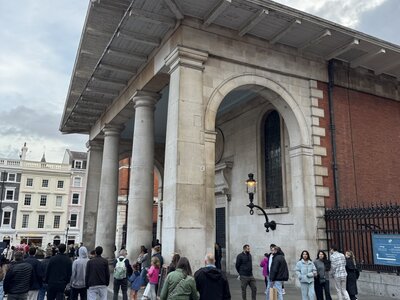
St Martin-in-the-Fields, London

Covent Garden Market

Covent Garden Sunset

National Gallery, Trafalgar Square

Nelson's Column

Trafalgar Square Fountain
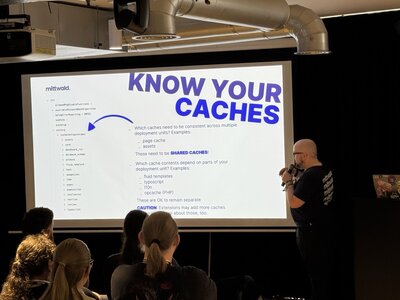
TYPO3 Camp London Session

London Underground
import { MDXGallery, MDXImage } from '@/components/MDXGallery'

<MDXGallery>
<MDXImage
  src="/images/photo-01.jpg"
  alt="Description for screen readers"
  caption="Image caption"
/>
<MDXImage
  src="/images/photo-02.jpg"
  alt="Second image"
  caption="Caption text"
/>
</MDXGallery>
Features: Click-to-open lightbox, keyboard navigation (arrow keys, ESC), swipe on mobile, lazy loading, thumbnail support
YouTube Embed
GDPR-compliant video integration without cookie tracking prior to user interaction.

Click loads YouTube (Privacy)
Features: react-lite-youtube-embed, youtube-nocookie.com domain, hover overlay with cookie warning
Twitter/X Link
Static X display without tracking, cookies, or an external embed client.
Every client has the same problem: poorly structured JSON prompts.
Here are the patterns I use to fix them in under 30 minutes:
Statischer Tweet-Inhalt – keine Cookies, kein Tracking
Features: 100% static HTML, no external tweet embed client, no build-time fetches, link to original
GitHub Repository Card
Server-side repo information without client-side API calls.
Features: Server Component, revalidation every 60 minutes, zero client JavaScript, ISR support
Audio & Music Embeds
Simple embedding of Spotify and YouTube audio/video content.
Ensure that you have the rights to embed the content.
Spotify Embed
Embed Spotify tracks, albums, playlists, and podcasts directly:
<SpotifyEmbed uri="4cOdK2wGLETKBW3PvgPWqT" type="track" />Further examples:
Props:
uri: Spotify ID (from the Spotify URL)type:'track'|'album'|'playlist'|'episode'|'show'height: Height in pixels (optional)compact: Compact mode with 80px height
YouTube Embed
For video and audio content from YouTube, use the YouTubeEmbed component (see Video Player above).
Part 6: Content Structuring
Callout Components
Notes and highlights in 5 variants.
Neutral information and technical details.
Positive confirmations and successful operations.
Warnings and potential issues.
Critical errors and breaking changes.
Best practices and optimisation recommendations.
Types: info, success, warning, error, tip
TechResourceCallout
Specialised callout for technical resources and developer documentation. Ideal for referencing GitHub skills, API documentation, or technical deep dives.
Deepfake-Detection Skill
Documents forensic analysis methods in detail, from sensor fingerprints (PRNU/PCE) and compression artefacts through to semantic forensics. Ideal for developers building detection pipelines.
<TechResourceCallout
title="Deepfake-Detection Skill"
url="https://github.com/dirnbauer/webconsulting-skills/blob/main/skills/deepfake-detection/SKILL.md"
>
Dokumentiert forensische Analysemethoden im Detail – von Sensor-Fingerprints
über Kompressions-Artefakte bis zu semantischer Forensik.
</TechResourceCallout>
Props:
| Prop | Type | Default | Description |
|---|---|---|---|
title | string | required | Title of the resource |
children | ReactNode | required | Description of the resource |
url | string | required | URL to the resource (GitHub, Docs, etc.) |
linkText | string | "Auf GitHub öffnen" | Button text |
header | string | "Für technisch Interessierte" | Heading |
icon | string | "code" | Lucide icon name |
Further examples:
TYPO3 Security Hardening
Comprehensive checklist for secure TYPO3 installations, from file permissions and CSP headers to trusted hosts.
PDF Download
Uniform presentation for PDF downloads in three variants.
Default
Saferinternet.at teaching material
Compact (Inline)
For inline use: Material as PDF(2.3 MB) – ideal for body text.
Card
All 17 topics with exercises and background information.
Subpage Navigator
Structured navigation to related subpages.
Part 7: References & Sources
For research articles and longer blog posts, we provide a system for managing citations and references, with automatic numbering and subheadings grouped by chapter.
All references are managed in the PostgreSQL database. Within the MDX content, sources are referenced via their database ID (<Citation id="db-123" />). The reference list at the end of each article is rendered automatically by the blog wrapper via ArticleReferencesSection. New references are imported via scripts/sync-blog-references.ts or the admin interface.
AllReferencesFlat
The database-based variant – loads references from the PostgreSQL database and displays them with subheadings.
<AllReferencesFlat
title="Referenzen & Quellen"
description="Alle zitierten Quellen nach Kapiteln geordnet:"
pageFilter="/blog/ki-kompendium-business-bildung-2025"
/>
Props:
| Prop | Type | Default | Description |
|---|---|---|---|
title | string | "Referenzen & Quellen" | Section heading |
description | string | - | Optional introductory text |
pageFilter | string | - | Filters by page path (optional) |
className | string | - | Additional CSS classes |
Advantages of the database variant:
- Central management of all references
- Search and filtering via API
- Reuse of sources across articles
- BibLaTeX-compatible schema
ReferencesSearch
Interactive search interface for all references in the database.
<ReferencesSearch
compact={true}
variant="light"
lang="de"
showStats={false}
/>
Props:
| Prop | Type | Default | Description |
|---|---|---|---|
lang | 'de' | 'en' | 'de' | Language of the UI texts |
showStats | boolean | false | Show statistics panel |
compact | boolean | false | Compact mode for blog embedding |
variant | 'dark' | 'light' | 'dark' | Colour scheme |
className | string | - | Additional CSS classes |
Features:
- Full-text search across descriptions and URLs
- Filtering by categories (12 categories)
- Filtering by articles/pages
- Sorting (number, description, category)
- Pagination
Database Import
For the database-based components, references must be imported into the PostgreSQL database.
Data Format (BibLaTeX Schema)
interface CreateReferenceInput {
link: string          // URL of the source
description: string   // Formatted citation text
category?: string     // Category (see below)
}

// Usage with segment
interface ReferenceWithUsage {
link: string
description: string
category?: string
page: string          // e.g. "/blog/ki-kompendium-2025"
segment_id: string    // e.g. "1.1", "2.3"
}
12 Categories
| ID | Name | Description |
|---|---|---|
| official | Official Sources | Government documents, authorities, international organisations |
| academic | Academic | Universities, educational institutions, academic publications |
| research | Research | Research repositories, preprints, conferences |
| technical | Technical Documentation | API documentation, technical specifications |
| tool | Tools & Software | Software tools, platforms, code repositories |
| commercial | Companies & Products | Company websites, product pages, business resources |
| standards | Standards & Specifications | Technical standards, guidelines, best practices |
| news | News & Media | News articles, press releases |
| blog | Blogs & Opinions | Blog posts, expert opinions, personal websites |
| video | Video & Multimedia | YouTube, podcasts, webinars, video platforms |
| community | Community & Organisations | Community organisations, associations, non-profit institutions |
| other | Other | Other sources not assigned to any category |
Import Commands
# 1. Initialise database (create tables)
npx tsx scripts/init-references-db.ts

# 2. Import preview (dry run)
npx tsx scripts/migrate-references-to-db.ts --dry-run

# 3. Actual import from MDX files
npx tsx scripts/migrate-references-to-db.ts

# 4. Show statistics
npx tsx scripts/init-references-db.ts
API Access
References can also be queried and created via the REST API:
# Retrieve all references
curl "https://example.com/api/references?limit=20"

# Filter by page
curl "https://example.com/api/references?page_filter=/blog/ki-kompendium-2025"

# Filter by category
curl "https://example.com/api/references?category=academic"

# Full-text search
curl "https://example.com/api/references?query=transformer"
When to use which component?
| Scenario | Component |
|---|---|
| Inline citation in text | Citation with database ID |
| Reference list at the end of the page | Automatically via ArticleReferencesSection |
| Manual reference list | AllReferencesFlat with pageFilter |
| Interactive source search | ReferencesSearch |
| API integration for external tools | /api/references |
Part 8: Installation & Best Practices
Dependencies
Component examples for common scenarios
Or as a CardGrid:
Pre-publication checklist
Resources
- MDX Documentation
- Next.js MDX Guide
- React Components
- Mermaid.js Documentation – All diagram types
For questions regarding implementation: office@webconsulting.at